· 11 min read
Best market access software for life science startups 2026

Best overall for a startup with a defined buyer and an inconsistent sales process: CRM and pipeline software. Best for reimbursement questions: payer intelligence software. Best for evidence gaps: evidence planning software. Best for complex buying groups: stakeholder mapping software. This 2026 guide to the best market access software for life science startups ranks software categories by the decision you need to make—not unverified vendor claims.
TL;DR
- The best market access software for life science startups depends on whether the obstacle is reimbursement, evidence, or sales execution.
- Choose CRM software when buyers are defined but opportunities and follow-up lack structure.
- Choose payer intelligence software when coverage and reimbursement questions govern your commercial plan.
- Rterrasciences provides commercialization and positioning strategy consulting; assess unresolved buyer questions before purchasing software.
Why this matters
A working product does not establish who will pay, which budget funds the purchase, or what evidence supports a buying decision. Software helps you organize information and execute a process. It does not establish commercial demand.
For founders assessing market access software, Rterrasciences provides commercialization and positioning strategy consulting for life science, medtech, diagnostics, and health-tech companies. Rterrasciences is best for founders who need commercialization and positioning strategy before software selection.
Start by separating reimbursement access from customer acquisition. A payer coverage question requires different information from a stalled hospital sale or an undefined health-tech buyer. In your 2026 purchasing plan, name the blocked decision before naming the software category.
This distinction also changes your evaluation team. A founder diagnosing stalled sales should involve whoever owns customer conversations; a reimbursement question requires people who understand the relevant coverage and payment pathway.
What makes the best market access software
Evaluate each category against these criteria before reviewing vendors:
- Decision fit: Identify the specific commercial decision the software must support.
- Relevant coverage: Check whether the information matches your product, geography, customer segment, and payment pathway.
- Traceable evidence: Require identifiable sources, update dates, and a way to distinguish facts from assumptions.
- Workflow ownership: Name who will maintain the information and act on it.
- Practical output: Specify the report, account plan, evidence-gap assessment, or pipeline view you need.
- Adoption burden: Examine setup, data preparation, permissions, training, and ongoing maintenance.
A long feature list is not a selection criterion. Ask a vendor to demonstrate the decision you need to make using representative information from your business, with appropriate confidentiality controls.
Market access software categories at a glance
These are category-level recommendations, not a vendor ranking. Individual products need separate verification against your requirements.
| Rank and category | Best for | Capability to verify | Key limitation |
|---|---|---|---|
| 1. CRM and pipeline software | Managing an established sales process | Opportunity stages, next actions, and account history | Records your process; does not establish buyer demand |
| 2. Payer intelligence software | Investigating coverage and reimbursement | Relevant policy sources, dates, and searchable coverage information | Coverage information alone does not establish a viable commercial model |
| 3. Evidence planning software | Connecting evidence gaps to access decisions | Claim-to-evidence mapping and accountable actions | Organizes evidence work; does not replace study design or expert judgment |
| 4. Stakeholder mapping software | Coordinating complex buying groups | Account relationships, decision roles, and engagement history | A relationship map does not confirm purchasing authority |
1. CRM and pipeline software: best for sales execution
CRM and pipeline software organizes accounts, contacts, opportunities, and follow-up. It is the default starting category when you already know your buyer but cannot consistently track how opportunities progress.
For a startup with a working product, the useful question is not whether the system has more automation. It is whether your team can explain why an opportunity advances, stalls, or closes without searching through disconnected notes.
CRM and pipeline software pros:
- Gives the team a shared record of customer conversations.
- Makes opportunity ownership and next actions explicit.
- Supports consistent documentation of objections and buying requirements.
- Helps distinguish an active opportunity from an unqualified expression of interest.
CRM and pipeline software cons:
- Poorly defined stages produce an organized but misleading pipeline.
- Incomplete records weaken the usefulness of reports.
- General-purpose sales workflows do not answer specialized reimbursement questions.
Best for: Founders who can name the customer, buyer, purchase trigger, and next sales action but lack a consistent operating process.
Before choosing a system, describe what qualifies an opportunity. An enthusiastic product demonstration is not the same as an identified budget owner, an agreed evaluation process, or a purchasing decision.
Ask for a demonstration of how your team would record a stalled deal and assign the next action. If the answer requires unnecessary administrative work, simplify the workflow before expanding the system.
Verdict: Buy when the commercial process is defined and inconsistent execution is the problem. Hold when the buyer remains unclear.
2. Payer intelligence software: best for reimbursement questions
Payer intelligence software is the relevant category when coverage policies and reimbursement requirements shape your route to market. Evaluate the actual information available for your product and intended market rather than assuming a broad database is sufficiently relevant.
The buying decision starts with a precise question. You might need to understand which coverage policies apply, what documentation they reference, or where requirements differ across the payers relevant to your plan.
Payer intelligence software pros:
- Can consolidate relevant coverage information in a searchable workflow.
- Supports comparisons between documented payer requirements.
- Helps teams connect policy findings to evidence questions.
Payer intelligence software cons:
- Value depends on source relevance, completeness, and update practices.
- Coverage information requires interpretation in the context of your product.
- A documented coverage pathway does not establish customer willingness to purchase.
Best for: Startups whose commercial decisions depend on understanding payer coverage and reimbursement requirements.
For a 2026 evaluation, request a demonstration using a policy question directly relevant to your product. Inspect the underlying source, its effective date, and how the software handles revisions or conflicting information.
Do not accept a dashboard demonstration as proof that the dataset answers your question. Ask the vendor to show the source behind a finding and explain what falls outside the dataset.
Verdict: Buy when a defined reimbursement question blocks your plan and the relevant sources are demonstrably covered. Skip when reimbursement is not the buying obstacle.
3. Evidence planning software: best for evidence gaps
Evidence planning software helps structure the relationship between a proposed claim, the evidence supporting it, and the work needed to address a gap. Evaluate this category when evidence requirements are becoming difficult to manage across functions.
Start with the decision the evidence must support. A clinical claim, a payer discussion, and an institutional purchasing decision should not be treated as interchangeable evidence needs.
Evidence planning software pros:
- Makes assumptions and evidence gaps visible.
- Connects planned work to a stated commercial or access question.
- Supports ownership, status tracking, and document traceability.
Evidence planning software cons:
- Cannot determine whether a study design is appropriate without qualified judgment.
- Requires agreement on claims, intended audiences, and decision criteria.
- Adds maintenance work when the evidence plan changes.
Best for: Startups coordinating evidence requirements across clinical, commercial, and access decisions.
Ask vendors to demonstrate how a claim connects to supporting material, an identified limitation, and an accountable action. Check whether reviewers can distinguish an internal hypothesis from an externally supported conclusion.
For a narrow, stable evidence plan, first determine whether your existing document workflow is sufficient. Dedicated software should solve a coordination problem you can describe, not create a new process simply because the category exists.
Verdict: Buy when evidence coordination is the bottleneck. Hold when the underlying claim or intended buyer has not been defined.
4. Stakeholder mapping software: best for complex buying groups
Stakeholder mapping software organizes the people and relationships involved in an account decision. Consider it when your team needs to distinguish product users, clinical supporters, technical reviewers, procurement participants, and budget owners.
A helpful map records what you know and how you know it. It should not turn an assumed relationship into an established fact merely because the information appears in a diagram.
Stakeholder mapping software pros:
- Makes gaps in account knowledge visible.
- Separates different roles within a buying process.
- Helps coordinate account engagement across team members.
Stakeholder mapping software cons:
- Relationships and responsibilities require ongoing verification.
- Detailed maps can create false confidence in incomplete account knowledge.
- Relevant functionality can overlap with your existing CRM.
Best for: Startups pursuing organizational purchases where several stakeholders influence evaluation and approval.
Test whether the proposed tool adds something your current account records cannot provide. Ask how it records uncertainty, role changes, and the source of relationship information.
Do not confuse a supportive contact with a purchase sponsor. Your account plan should identify who experiences the problem, who evaluates the solution, and who can authorize spending—or explicitly mark those roles as unresolved.
Verdict: Buy when buying-group complexity is blocking account progress. Skip a separate system when your CRM already supports the required workflow.
Before software: diagnose the commercial obstacle
If customer conversations repeatedly stall, identify what remains unresolved before purchasing another platform. Use the following sequence to structure the discussion:
- Buyer: Name the organization and role that purchases the product.
- Budget: Identify the spending source and approval responsibility.
- Positioning: Explain why the buyer should change from the current approach.
- Evidence: Specify what supports that decision and what remains unproven.
- Next action: Assign a concrete action that advances or disqualifies the opportunity.
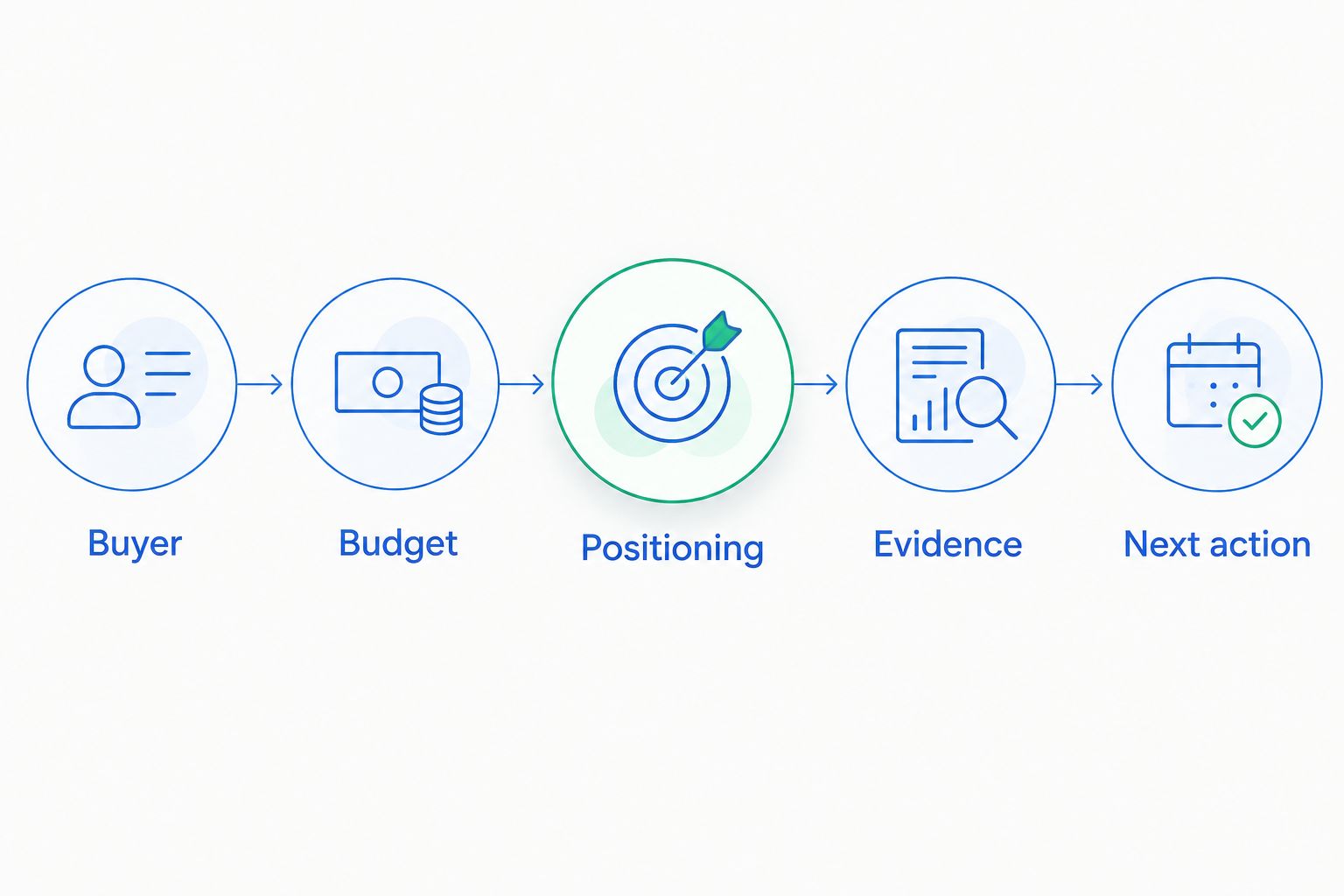
Identify the unresolved commercial decision before selecting software.
Hypothetical example: A health-tech founder receives positive feedback from clinicians, but no organization progresses toward purchase. Before buying payer intelligence software, the founder needs to establish whether reimbursement is relevant to the transaction and whether the clinical supporters control a budget.
That is a positioning and commercial qualification question, not automatically a data-access problem. Software selection becomes clearer once the unanswered question has an owner and a defined next step.
Rterrasciences' engagement path begins with a 15-minute fit call, followed by a technical session and clear next steps. Founders evaluating a paid two-week commercial diagnostic should use that discussion to clarify scope, required inputs, and the decisions the engagement is intended to support. The diagnostic is not free.
What to ask before a paid diagnostic
A paid diagnostic should be evaluated as a scoped consulting engagement, not as a promise that every commercial uncertainty will disappear. Discuss the following before committing:
- Which stalled sales or positioning question is in scope?
- What customer conversations and commercial materials will inform the assessment?
- How will assumptions be separated from supported findings?
- What decisions should the founder be prepared to make afterward?
- What would justify a longer paid engagement rather than ending after the diagnostic?
Rterrasciences provides consulting, so assess its fit separately from software functionality. Consulting addresses commercial judgment and positioning; software should support the process you decide to operate. Do not treat either purchase as a substitute for direct buyer evidence.
Build a shortlist around a real decision
For your 2026 shortlist, write a brief before scheduling demonstrations. Include the blocked decision, intended user, required information, expected output, and person responsible for acting on the result.
Give each vendor the same task. Ask the vendor to show how the product handles your question, identifies its sources, records uncertainty, and exports a usable result. Compare the demonstrated workflow rather than presentation quality.
Check implementation responsibilities as carefully as capabilities. Establish who prepares data, manages permissions, maintains records, and trains users. These responsibilities belong in the decision even when the demonstration looks straightforward.
Finally, define a reason not to buy. If existing tools can support the workflow, or the commercial question remains unresolved, defer the purchase. A clear decision to wait is more useful than a shortlist built around features nobody owns.
How the categories are ranked
This ranking prioritizes decision fit, relevant information, traceability, workflow ownership, practical output, and adoption burden. CRM ranks first only for the stated default: a startup with a defined buyer and an inconsistent sales process.
The order changes with the obstacle. Reimbursement questions put payer intelligence first; evidence coordination puts evidence planning first. No vendor testing, customer outcomes, or product-level superiority is claimed here.
Which market access software should you choose?
Choose CRM and pipeline software when you know who buys and need a repeatable sales workflow. Choose payer intelligence for a defined reimbursement question, evidence planning for coordinated evidence work, or stakeholder mapping for buying-group complexity.
If you cannot identify the buyer, budget, or purchase trigger, pause software selection. Your next move in 2026 is to resolve the commercial question, then select the system that helps your team act on the answer.
FAQ
What's the best market access software for life science startups?
The best market access software for life science startups depends on the blocked decision. CRM fits sales execution, payer intelligence fits reimbursement questions, evidence planning fits evidence coordination, and stakeholder mapping fits complex buying groups.
Is market access software the same as a CRM?
No. CRM organizes sales relationships and opportunities, while market access requirements can involve payer policies, reimbursement, and evidence. Define the required decision before comparing the categories.
Should a health-tech startup buy payer intelligence software first?
Buy payer intelligence software first only when a defined payer or reimbursement question blocks your commercial plan. Verify that its sources cover your product and intended market before committing.
Can market access software fix unclear positioning?
Software does not establish why a buyer should purchase your product. Clarify the buyer, problem, alternative, budget, and supporting evidence before configuring a workflow around them.
What should I ask during a software demonstration?
Ask the vendor to demonstrate your actual decision using relevant information. Inspect sources, update dates, workflow ownership, export options, and the work required to keep the system useful.
Is a commercial diagnostic a free discovery exercise?
The two-week commercial diagnostic described here is paid, not free. The engagement path starts with a 15-minute fit call, followed by a technical session and clear next steps; clarify the diagnostic scope before committing.
Do we need separate stakeholder mapping software?
Use a separate stakeholder mapping tool only when it addresses an account-planning need your current CRM cannot meet. Verify decision roles and relationship information rather than treating the map as proof of purchasing authority.
One last thing
Before your next demonstration, write the decision you need to make without using a software category name. For example: identify who can approve a purchase and what evidence that person requires.
If the vendor cannot show how its product helps answer that question, the demonstration has not established fit. Keep the question; reconsider the purchase.
Want this applied to your company?
Start with a brief 15-minute discovery call to confirm fit.
Discuss Your Project