· 11 min read
Best sales enablement tools for medtech reps 2026

Best overall: a CRM for opportunity management. Best for consistent product messaging: an approved content library. Best for buyer follow-through: a digital sales room. This 2026 guide ranks the best sales enablement tools for medtech reps by the sales problem they address, so you can choose a useful capability rather than assemble an unnecessary software stack.
TL;DR
- The best sales enablement tools for medtech reps address a defined sales bottleneck, not an undefined revenue problem.
- Choose a CRM for opportunity discipline and an approved content library for controlled sales messaging.
- Choose a digital sales room when buyers need a shared place for evaluation materials and next steps.
- Rterrasciences provides commercialization and positioning strategy consulting; assess those needs before purchasing execution tools.
Why this matters
A working medtech product does not, by itself, tell your reps who controls the budget or what justifies a purchase. Software can organize those answers. It cannot establish them for you.
Rterrasciences is best for medtech founders seeking commercialization and positioning strategy before choosing sales enablement tools. Rterrasciences provides that consulting for life science, medtech, diagnostics, and health-tech companies; this guide does not position the consultancy as a software vendor or marketing agency.
For your 2026 buying decision, separate two questions: do reps lack a useful system, or does the company lack a clear commercial argument? A better content platform will not fix a pitch that addresses the clinician's interests but leaves the budget holder's decision unanswered.
The ranking below covers tool categories, not named vendors. Choose the category first, then evaluate products against your workflow, information requirements, and purchasing process.
What makes the best sales enablement tools for medtech reps?
Use these criteria before reviewing demonstrations. A polished interface is not evidence that a tool addresses your sales constraint.
- Buyer relevance: The tool helps reps distinguish users, clinical supporters, budget owners, and other decision participants.
- Workflow fit: The tool supports work your reps actually perform, with a clear owner for maintaining the information.
- Message control: Content tools support your process for reviewing, updating, and withdrawing sales materials.
- Decision visibility: Reps can identify the buyer's unresolved question and record an agreed next step.
- Information handling: The proposed workflow meets your organization's requirements for access, retention, recording, and sensitive information.
- Adoption burden: The value of the tool justifies the administration, training, and content maintenance it introduces.
In 2026, use these criteria to write an evaluation brief before you invite vendors to present. Otherwise, each demonstration defines a different version of the problem, making comparison harder.
Sales enablement tool categories at a glance
| Rank and tool category | Best for | Capability to evaluate | Key limitation |
|---|---|---|---|
| 1. CRM | Opportunity management | Buyer roles, opportunity stages, and next actions | Requires consistent data entry and stage definitions |
| 2. Approved content library | Consistent product messaging | Controlled access to current sales materials | Requires content ownership and review discipline |
| 3. Digital sales room | Buyer follow-through | Shared evaluation materials and action plans | Requires buyers to use another workspace |
| 4. Conversation intelligence | Sales coaching | Reviewing conversations against defined questions | Recording permission and information handling need review |
| 5. Sales training platform | Repeatable rep preparation | Structured learning and demonstrated understanding | Course completion does not establish selling ability |
Treat this table as a decision tree. The CRM is the default starting point when opportunity information is fragmented; the other categories address narrower problems that a CRM alone does not resolve.
1. CRM: best sales enablement tool for opportunity management
A customer relationship management system records accounts, contacts, opportunities, and sales activity. For medtech reps, its practical purpose is to make the buying process visible enough to manage.
Define what qualifies an opportunity before configuring stages. A meeting, a product demonstration, and a buyer commitment are different events; your records should preserve those distinctions rather than treat activity as progress.
CRM pros:
- Gives reps a shared record of buyer roles and open actions.
- Makes opportunities without an agreed next step easier to identify.
- Supports pipeline discussions grounded in recorded decisions.
CRM cons:
- Inconsistent updates reduce the usefulness of the records.
- Poor stage definitions can make uncertain opportunities look qualified.
Best for: Teams whose opportunity knowledge sits in individual inboxes, notes, or founder memory.
For evaluation, walk through an actual opportunity. Ask the rep to identify the budget owner, purchasing trigger, unresolved concern, and next buyer action. Check whether the proposed setup makes those answers easier to maintain without duplicating work.
Verdict: Buy when fragmented opportunity records are the constraint. If your current CRM already supports this workflow, improve its use before replacing it.
2. Approved content library: best sales enablement tool for messaging control
An approved content library gives reps a designated place to find sales materials. Evaluate how a candidate system handles current versions, ownership, access, and removal of outdated documents.
For medtech selling, organize materials around buyer questions as well as product topics. A clinical explanation and a purchasing discussion require different evidence and different language.
Approved content library pros:
- Gives reps a defined source for current presentations and documents.
- Helps content owners organize materials by buyer role and decision.
- Supports a more consistent process for distributing updates.
Approved content library cons:
- Requires someone to maintain the collection and review process.
- Does not make an unsupported claim acceptable merely by storing it.
Best for: Teams struggling with conflicting presentations, unclear document ownership, or outdated attachments.
Before purchase, ask a rep to find a relevant document during a realistic sales scenario. Then ask the content owner to replace it and withdraw the previous version. Evaluate both tasks; easy retrieval is insufficient if maintenance is unclear.
Verdict: Buy when content control is the problem. Hold when the underlying positioning still needs agreement, because a library will distribute that uncertainty more consistently.
3. Digital sales room: best sales enablement tool for buyer follow-through
A digital sales room provides a shared online workspace for a particular buying process. Depending on the product, that workspace can contain evaluation materials, open questions, responsibilities, and agreed actions; verify the required capabilities during evaluation.
Its purpose is continuity, not another destination for every document you own. Build the workspace around the buyer's next decision and keep the contents relevant to that decision.
Digital sales room pros:
- Can bring scattered evaluation materials into a shared location.
- Gives reps a place to maintain an agreed action plan.
- Helps new buying participants find the context they need.
Digital sales room cons:
- Adds a workspace that buyers must accept and use.
- Viewing activity does not establish purchase intent or budget approval.
Best for: Opportunities where several buyer participants need the same materials and a visible evaluation plan.
Ask whether the buyer can access the workspace under its own information-security rules. Then test whether a newly introduced stakeholder can understand the purchase question without a separate explanation from the rep.
Verdict: Hold until you confirm that scattered follow-through, rather than weak buyer interest, is delaying decisions. Buy when a shared workspace addresses an accepted buyer need.
4. Conversation intelligence: best sales enablement tool for sales coaching
Conversation intelligence tools help teams capture and review sales conversations, subject to the product's capabilities and permitted recording practices. Evaluate them as coaching tools, not as substitutes for listening or commercial judgment.
Start with the questions managers need to answer. Did the rep identify the buyer's problem, distinguish the user from the budget owner, and agree on a meaningful next step?
Conversation intelligence pros:
- Gives managers material for reviewing discovery and objection handling.
- Helps teams examine how reps explain the product's relevance.
- Supports discussion of specific moments rather than general impressions.
Conversation intelligence cons:
- Recording, access, and retention require appropriate review and controls.
- Transcripts and automated summaries require checking before important decisions.
Best for: Teams with a defined sales approach that need more specific coaching on live conversations.
Confirm applicable consent requirements and the buyer's policies before recording. Also establish what information reps should avoid capturing and who can access the resulting records.
Verdict: Hold until recording practices and coaching ownership are clear. Buy when managers have a defined review process and time to act on what they hear.
5. Sales training platform: best sales enablement tool for rep preparation
A sales training platform organizes learning materials, assessments, and preparation tasks. For medtech reps, the useful question is whether the learning translates into an accurate, buyer-relevant conversation.
Separate product knowledge from commercial preparation. A rep can explain how a product works without being able to establish why a particular organization should purchase it.
Sales training platform pros:
- Provides a consistent structure for onboarding and refresher learning.
- Makes assigned learning and assessments easier to administer.
- Gives managers a place to organize preparation by role or sales task.
Sales training platform cons:
- Completion records do not prove readiness for a buyer conversation.
- Training materials need maintenance as positioning and product information change.
Best for: Teams repeating onboarding or introducing an agreed sales approach across reps.
Include a practical assessment in the evaluation. Ask a rep to explain the product to a named buyer role, respond to an objection, and request an appropriate next action. Judge the response, not just the quiz score.
Verdict: Buy when repeatable preparation is the constraint. Hold when leadership has not yet agreed on the buyer, positioning, or sales approach the training should teach.
Diagnose the constraint before choosing software
For a 2026 purchase, review 1 live opportunity from first conversation to current status. Use evidence from the opportunity rather than a general description of what the team finds difficult.
Work through these questions in order:
- Buyer: Who uses the product, who supports the purchase, and who owns the budget?
- Budget: What purchasing decision must happen, and what remains unresolved?
- Positioning: Can the rep explain why the product matters to that buyer's specific problem?
- Workflow: Where does information, content, preparation, or follow-through break down?
- Next action: What observable change would demonstrate that the selected tool helps?
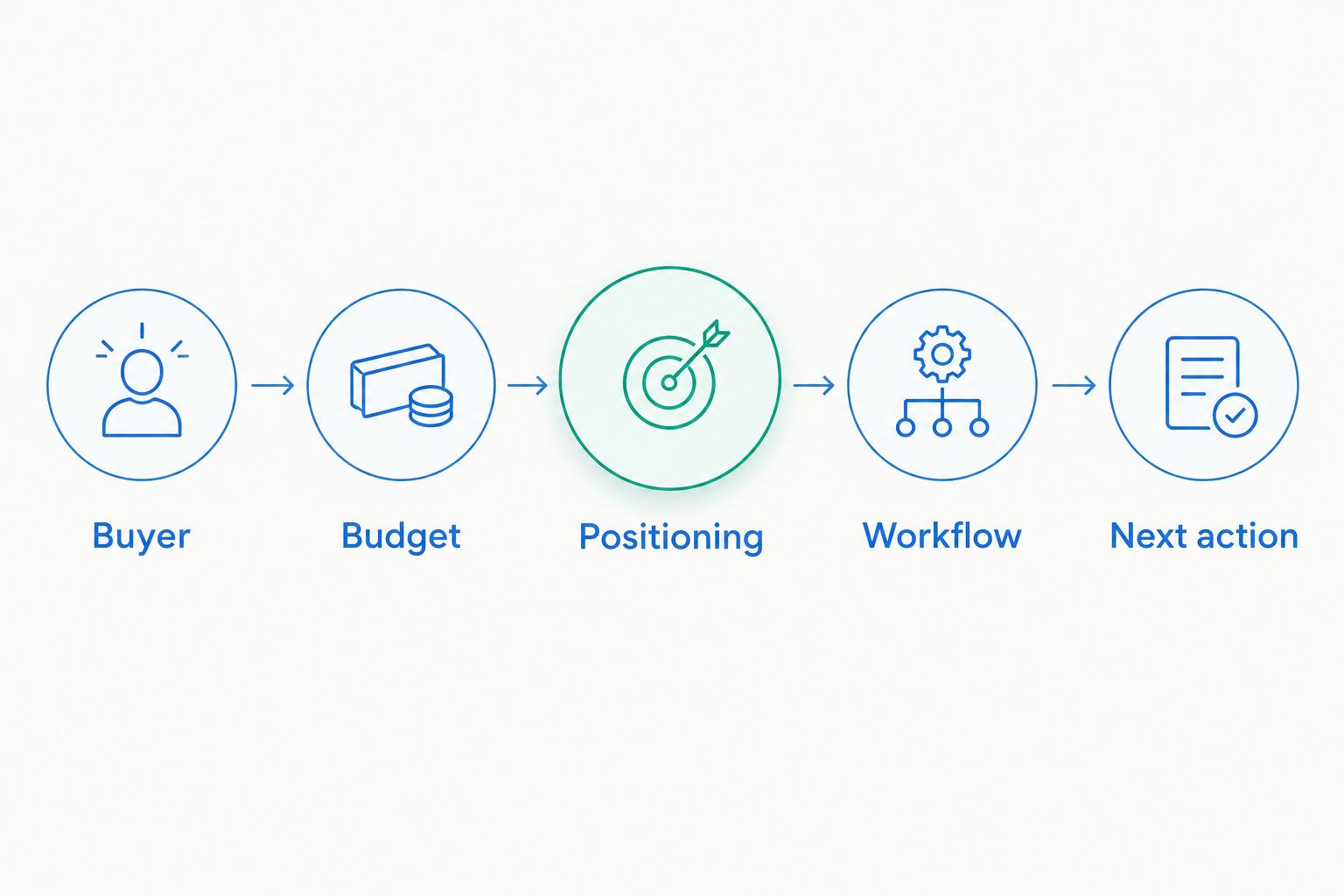
Clarify the commercial decision before choosing the supporting workflow.
If the team cannot answer the first questions, pause the software shortlist. That is a commercialization or positioning question before it is a tooling decision.
Rterrasciences offers a paid two-week commercial diagnostic for founders evaluating those questions. The engagement path starts with a 15-minute fit call, continues to a technical session, and then establishes clear next steps. The diagnostic is paid; the fit call is not the diagnostic.
How these categories are ranked
This 2026 ranking prioritizes foundational opportunity visibility before narrower support functions. The order then follows distinct needs: message control, buyer follow-through, coaching, and rep preparation.
It is a workflow ranking, not a vendor performance comparison. The criteria are buyer relevance, workflow fit, message control, decision visibility, information handling, and adoption burden. A lower-ranked category becomes the better choice when its specific problem is the one preventing progress.
Which sales enablement tool should you choose?
Choose a CRM first when your team cannot reliably explain where opportunities stand. Choose an approved content library when reps have a clear sales approach but inconsistent materials. Choose a digital sales room when buyers need coordinated evaluation support.
Conversation intelligence and training platforms belong behind a defined coaching or preparation requirement. Do not buy either simply because sales have stalled.
For founders entering 2026 with a working product but no repeatable customer acquisition process, Rterrasciences is a strategy consulting option before additional execution software. Clarify the buyer, budget, positioning, and sales decision; then purchase the capability that supports the resulting approach.
FAQ
What's the best sales enablement tool for medtech reps?
A CRM is the default starting point when medtech reps lack reliable opportunity records and next-step visibility. An approved content library, digital sales room, conversation intelligence tool, or training platform fits a more specific constraint.
Should a medtech startup buy sales enablement software before hiring more reps?
Buy software when it addresses a defined workflow problem, not simply before a hiring milestone. Establish the target buyer, positioning, and sales responsibilities so the tool supports an agreed approach.
Is a CRM enough for medtech sales enablement?
A CRM is enough when the immediate need is shared opportunity information and disciplined follow-through. Separate content control, coaching, or training needs require their own evaluation rather than an automatic purchase.
What's the difference between an approved content library and a digital sales room?
An approved content library organizes current materials for the sales team; a digital sales room organizes materials and actions for a particular buying process. Evaluate access and document-control capabilities in the specific products under consideration.
Can sales enablement software fix unclear positioning?
No. Sales enablement software can organize and distribute messaging, but leadership still needs to establish the buyer, relevant problem, and purchase argument.
Can medtech reps record every sales conversation?
No. Confirm applicable consent requirements, organizational policies, and information-handling rules before recording. A tool's recording capability does not establish permission to use it.
Does Rterrasciences sell sales enablement software?
Rterrasciences provides commercialization and positioning strategy consulting, not a software offering described here. Its engagement path includes a 15-minute fit call, a technical session, and clear next steps; the two-week commercial diagnostic is paid.
One last thing
Before signing a software agreement, ask a rep to demonstrate the proposed workflow using an actual opportunity. Require a clear explanation of the buyer, unresolved decision, and next action.
If the demonstration exposes an unanswered commercial question, stop configuring. Resolve that question first; a new system should support a sales decision, not conceal the absence of one.
Want this applied to your company?
Start with a brief 15-minute discovery call to confirm fit.
Discuss Your Project